The WeRX Brands  |  StrategyWeRX  | WeRX.Marketing  | MentorWeRX  | ProsperWeRX

Your cart is empty :(

Cybersecurity Threats to Watch Out For: Summer 2026 Update

Padlock Securing a Laptop Computer on a Desk
  • Written By: John O'Hara
  • Blog Post Blurb: Your business faces cybersecurity threats from everything from outdated software to prompt injection attacks. Here are the threats to tackle in Q3-Q4 2026.
  • Blog Post Offer 1 Description: Start growing your business with the right technology.
  • Blog Post Offer 1 Button Text: Book a consult now
  • Blog Post Offer 1 Link: https://meetings.hubspot.com/andrea-hill/15-minute-consult-with-andrea

When it comes to cybersecurity threats, 2026 has featured a mix of old and new, with one particular new threat ramping up in the second half of the year. Weak and recycled passwords, failure to set up 2FA, phishing emails and text scams, and out-of-date software are still the main threats to your business.

While we’re still playing all the old hits, there is a new tune that will be playing everywhere in the second half of 2026: artificial intelligence. The threat that AI will replace every white-collar job hasn’t borne fruit, but it has certainly 10X’d hacker and scammer productivity this year. The main cybersecurity threats we’ll have to deal with in 2026 have to do with AI, but there are some other threats to stay aware of.

Microsoft Ends Support for Windows 10

Microsoft ended support for Windows 10 back in October, 2025. If you are still using Windows 10 devices, either update to Windows 11 or subscribe to receive continued updates. Yeah, it’s not a great move by Microsoft to charge us for continued Windows 10 support when Windows 11 is still so full of issues, but those are your options if your business is running Windows. The other thing to be aware of is that Windows Server 2016 extended support is scheduled to end on January 12, 2027. Outdated software is at a higher risk for attacks, so keep your OS up to date, as it’s the most important piece of software on your computer.

Even If You’re Not Using AI, You’re Probably Using AI

Just about every piece of business software today has some form of AI in it, whether it’s standard machine learning or a large language model (usually in the form of a chatbot). So even if you’d rather take a more cautious approach to AI implementation, it’s hard to know which parts of which apps to use or avoid, if they’re even possible to avoid.

Understanding and addressing AI cybersecurity threats presents a new set of challenges to your business. Working with reputable software developers and vendors has always been important, but it’s even more important today, in the era of AI generated code and LLM “wrappers” (apps that add a custom interface to someone else’s AI model), to do your due diligence and inquire as to how and where AI was used in the development of a product.

Before adding a new piece of tech to your stack, confirm whether the code was written by a software engineer or by an LLM like Claude Code. If the code was AI generated, confirm that it was thoroughly vetted by a software engineer and that the code can be easily updated and patched whenever necessary.

In general, only work with software vendors that have experience and a track record of successful implementations, satisfied customers, and financial stability that they can point to, reassuring you that they won’t just disappear overnight.

Unsupervised, Unfocused Use of Agents

It’s not just shoddy vibe-coded software you have to worry about. Your own employees’ use of generative AI tools can harm your business. New, unproven tools come with new, unprecedented risks. We’ve seen multiple reports of agents deleting files even after being specifically told not to delete files. While they are being touted as coworkers and replacements for employees, these are tools that can cause more harm than good if given free rein to make decisions you would normally entrust to a reasonable and experienced person. At least when people make mistakes, they make mistakes in predictably human ways and can be taught the right way to do things. AI errors are unpredictable, so make sure there is a knowledgeable employee in control.

Prompt Injection Attacks

Another danger of large language models is the prompt injection attack. A prompt injection is a way for a user to bypass a chatbot’s safety protocols. For example, say you want to learn how to create malware or a virus, but the chatbot’s guardrails prevent it from answering the question. So you word your question in such a way that it subverts or bypasses these guardrails and you get the response you’re looking for.

The most likely way hackers would try to use AI to harm your business is through indirect prompt injections. In an indirect prompt injection attack, the person doing the prompt injection isn’t the person using the chatbot, but a third party. For example, let’s say you receive a long email from what seems to be a client or coworker. Unbeknownst to you, the email is actually from an attacker who has included text in the message that you can’t see (i.e. the text is the same color as the background).

This text contains malicious instructions for an AI tool to follow, so if you use AI to summarize the email, that text—the prompt injection—will tell the AI to do any number of things that can harm your computer or your business. It might, for instance, instruct the AI to forward all emails to the attacker, giving them access to private information. If the AI has access to any AI agents you’ve deployed, the results could be even more catastrophic, giving the attacker access to passwords and bank accounts as well as the ability to perform tasks within your systems.

This kind of attack doesn’t just happen via email; a shared Google doc you thought was from a trusted source could also contain hidden malicious instructions. As generative AI makes its way into nearly every SaaS platform, users have to be increasingly aware of what these tools are doing and what they have access to.

Email Fraud

Scammers don’t need access to these high-tech tools as long as they can fool employees into thinking fraudulent emails are legitimate. You’ve probably already noticed an increase in spam emails appearing to be completely legitimate messages from coworkers or trusted businesses. It is crucial that you train your employees to recognize these scams, be skeptical of every email they receive, and, most importantly, to never click a link or download an attachment in an email without first confirming that the link or attachment is safe.

Stay Safe Through Caution, Deliberation, and Strategy

The way AI is marketed has generated a great deal of FOMO throughout the business world. Businesses everywhere are rushing to adopt the technology, afraid of being left behind, without first learning how the technology works and what its strengths and weaknesses are. It’s important not to succumb to this fear of missing out and approach new technology the same way businesses always have: through caution, deliberation, thorough research, limited testing and pilot programs before company-wide rollouts, and, of course, a strategic foundation.

Before implementing any new software, whether it’s a shiny new AI agent or a boring old SaaS suite, understand why you need it, how it fits into your strategy, how it helps you achieve your goals, and how you will measure whether or not the implementation has been successful. As if wrapping our heads around cloud computing and software as a service wasn’t difficult enough in the 2010s, artificial intelligence introduces another level of complexity to strategy. To get started on your own AI implementation strategy rooted in rationality and results, check out Straight Talk: The No-Nonsense Guide to Strategic AI Adoption, available from the sidebar on the right (or at the bottom of this page on mobile) or wherever you buy your books online.

Tech Strategy

  • Hits: 368

Using Technology to Personalize the Customer Experience

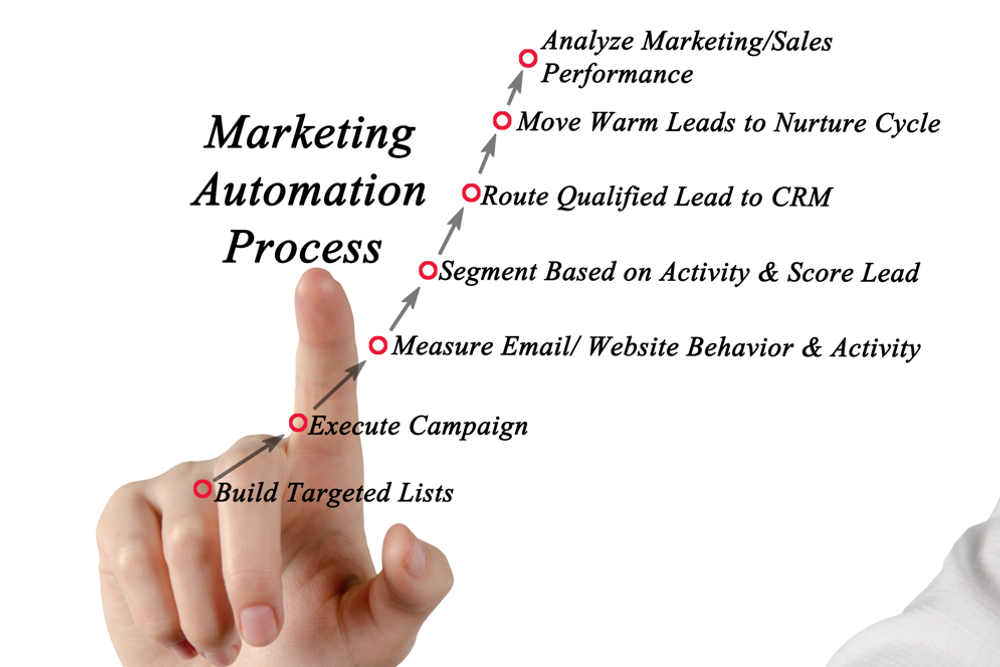
Marketing Automation Process

Do you have just one generic topic of conversation for everybody you know? Probably not, right? You know what your close friends and family are interested in, and you can ask them specific questions about it and show genuine interest. When you pass that neighbor you hardly know on the street, you might give him the old “cold enough for ya?” and move on. But when you really want to build a relationship with someone and show them you care, conversations get more personal and varied. When you connect with people, you find common ground. You talk about things that are important to them. You personalize.

Customers have so much choice these days that just offering great products might not be enough. You need to build a relationship with them. While these relationships won’t be as intimate as a relationship with a family member, you can still show them you care. This typically takes the form of emails or text messages that are relevant to them and what they need from you.

If you have only a handful of customers—say, no more than 20—you can probably take the time to talk to each one personally and get to know them. But when you’re dealing with hundreds, thousands, or tens of thousands of customers, personalization requires a little help from technology.

Smart CRM

Your CRM is the place to store all of your information about your customers and contacts, but if that’s all you’re using it for, you’re missing out on some of its most powerful marketing features. While personalized marketing was a differentiator just a few years ago, it’s a basic customer expectation these days. Your CRM is the place to bring together data on all customer interactions. Based on that data, you can create segmented email lists and create workflows that trigger personalized emails when certain conditions are met.

List Segmentation

There are a number of ways you can segment your email lists to personalize communication. Demographic segmentation separates customers based on factors like age and gender. Geographic segmentation is useful if you offer different products or promotions to people in different parts of the world. Lifecycle segmentation, particularly useful in B2B, lets you create lists based on where leads and customers are in their journey with you, whether they are new subscribers, marketing or sales qualified leads, or current customers.

With customers in different lists, you can enter them into different kinds of email sequences so that each group only gets information that is relevant to them. Customers are more likely to open relevant emails and more likely to click on links. In the process, you’re building trust, which is the foundation of any relationship.

Creating Workflows

Workflows go a step further than segmentation, personalizing messages based on behavior rather than demographics—that is, based on what they do rather than what they are. For example, you can create workflows that enter customers into a “welcome” sequence when they first give you their email address. If they leave without buying anything, but come back a month later, a workflow can trigger a “welcome back” email. You can also create workflows for website visitors who look at certain pages or leads who browse your online catalogue or request a quote. The marketing team crafts the content that speaks to each group, and the automations make sure the right people see those messages.

Give Customers What They’re Expecting

Personalization is how you stand out from the crowd and make the kind of connections that encourage not only customer loyalty but brand advocacy and personal identification with a brand. While personalization was once a differentiator, customers have come to expect some level of personalization in their interactions with a business. It’s an opportunity for you to demonstrate what your business is about and get the attention of the right kind of customer, but doing it at scale requires a little help from technology. A smart CRM makes it easy to create lists and workflows so that the right content gets to the right customers at the right moment.

CRM, Tech Strategy

  • Hits: 299

ERP Systems Get Your Business in Alignment

Brainstorming Concept With Pensive Businesswoman Looking At Blackboard With Handwritten.
  • Written By: John O’Hara
  • Blog Post Blurb: If you want to scale, you need systems that are scalable. An ERP is that scalable system businesses need to align processes with strategy across divisions.
  • Blog Post Offer 1 Description: Start growing your business with the right technology.
  • Blog Post Offer 1 Button Text: Book a consult now
  • Blog Post Offer 1 Link: https://meetings.hubspot.com/andrea-hill/15-minute-consult-with-andrea

When we think of ERP systems (and we think a lot about ERP systems), we tend to imagine the complex systems that coordinate the operations of massive enterprises employing thousands of people across multiple divisions around the country or the world. It’s right there in the name: Enterprise Resource Planning. It’s time to rethink the ERP system. It’s not just for enterprise-sized businesses anymore. If you run a small business and your goals involve growth, you probably need an ERP.

Microbusinesses with one or just a few employees might get by for a while without clearly mapped processes. For these businesses, scattered recordkeeping, disorganized folders, and working from spreadsheets with inconsistent formatting might be not much more than a nuisance and a source of minor frustration. But if you want to grow beyond “just getting by” and become a fully fledged small business or a mid-sized business employing 100 people or more, you’ll need to centralize your data and operations as soon as possible.

If you want to scale, you need systems that are scalable. An ERP is that scalable system every small or medium-sized business needs to reduce errors, improve efficiency, automate all of those little administrative tasks that take up a lot of your time, and most importantly, align your strategy with your goals and the operations of every department, now and into the future.

Alignment Is Not Just for Cars

Small businesses often have to overcome two distinct hurdles as they grow. The first is that the founder is used to doing a little bit of everything. They know how everything works, and everything funnels through them. The second is that as the company grows and employees are more left to their own devices, each department starts to develop its own processes if clear processes weren’t already laid down. This could lead to information silos and departments working toward their own goals in isolation. A business whose employees are working at cross purposes because they have no single source of truth is a business that is out of alignment.

When your car is out of alignment, you’ll find yourself tugging the steering wheel to the left just to keep the car going straight. The car wants to go to the right, you want it to go straight, and you end up wearing out your tires, using more gas, and causing damage to your tie rods, ball joints, and other parts you swear your mechanic is just making up on the spot so he can charge you more for repairs.

When parts of your business are out of alignment, they are pulling in different directions. You want your business to run straight in the direction of growth. Without an ERP system, marketing might have their own ideas of how to get there, and each member of the sales team might be using their own messaging that has nothing to do with the messages being pushed by marketing, and product development teams might not be listening to feedback from sales or customer support. Everyone has their own idea of how to do things.

Implemented correctly, an ERP system brings all of the parts of your business into alignment. It centralizes data and integrates all of these individual systems and processes into a single platform, where each department and team can communicate, collaborate, access the most up-to-date information, and work from the same playbook. This level of integration gets operations, sales, and marketing all working toward the same goal and putting out a unified message to customers.

The ERP Mindset

ERP systems don’t just do this on their own. ERP isn’t just a piece of software; it’s a mindset. It’s a commitment to a better way of running your business, and the shift to an ERP mindset has to occur before you install an ERP system. The first step is to set yourself up for a successful implementation. That means developing a growth strategy, setting goals, and developing the frameworks across all departments to help you meet those goals. Once your strategy is in place, an ERP system becomes the “brain” that keeps the many-limbed creature that is your business moving in the same direction.

Efficiency, Growth

  • Hits: 371

Creating a Positive Employee Experience

Group of happy multiethnic collogues stacking hands together

Creating a Positive Employee Experience

It’s been a couple of years since “customer experience” became a marketing buzzword. At this point, a great customer experience is no longer a differentiator but something customers have come to expect. In both B2B and B2C, customers have so many options that a great experience is often the difference between making a sale and losing one, or between making a one-time sale and gaining a loyal customer. In order to deliver the kind of experience your customers expect, you first have to create the conditions for a positive employee experience. 

Employee experience is important because it feeds customer experience. It’s more than just making employees happy. It’s a way of doing business that requires a clear vision, consistent values, and well-defined processes that empower employees to make the right decision, get help when they need it, and grow as members of a team. This isn’t just for customer-facing employees, either. When every employee can have a consistent, positive experience at work, the whole business thrives.

It Starts With Strategy

Creating a positive employee experience begins at the top, with strategy and values. When we work on strategy with clients, we begin with three questions: Who are you? What do you do that makes you different? Why do you matter? The answers to these questions are the foundation of everything you do as a business owner, how you do it, and why you do it. They inform all of your processes, how your employees work, and what kind of relationships with customers you build. Your values will inform the way you pursue your strategy. If they are held to consistently, they will permeate company culture and provide clear and consistent expectations for every employee.

Build Processes That Reduce Confusion and Foster Collaboration

A “process” is a series of actions that leads to a desired outcome. Your business should have clear guidelines for typical processes that outline the right way or best way to complete a task or achieve an outcome. When these processes are thoughtfully mapped and thoroughly documented, employees know what they’re doing and how to do it, and if they don’t, they know where to find the right information. Employees become more competent, more empowered, and less frustrated by inefficiency. A better experience for them translates to a better experience for your customers.

Get Help from the Right Technology

There are tons of software products out there that will help you run your business more smoothly, resulting in a better experience for you, your employees, and your customers. The most important of these is a Customer Relationship Management system. CRM is a way of doing business built around a software system that brings all customer interactions and past purchases into one place, fostering communication and collaboration between teams and providing tools for automation, data analysis, and project management.

How do you know which tools are the right ones? What’s right for you depends on where you are and where you want to be. The right CRM, ERP, project management software, payroll, or communication tools for your business are the ones that, once implemented, help you achieve your goals more efficiently and with less stress.

Satisfied Employees, Satisfied Customers

As we covered in more detail in this article, most employees want some combination of the same things: competitive compensation, flexible scheduling, a pleasant environment in which they feel respected and welcomed, and the opportunity to grow professionally. When employees feel valued, when there is a sense of consistency and fairness, when they are encouraged to stay curious and keep learning, when they are given tools that make their job easier, the tranquility and good vibes that come from a working environment like that will filter through everything you do and result in the same experience for your customers.

Productivity, Tech Strategy

  • Hits: 517

Cloud Computing Benefits and Best Practices

Close Up Laptop Keyboard With Abstract Glowing Cloud And Chip Interface On Blurry Background. Cloud
  • Written By: John O’Hara
  • Blog Post Blurb: “Cloud computing” sounds mysterious and magical, but it’s easy to understand. Read on for a brief explanation and a few tips on cloud computing best practices.
  • Blog Post Offer 1 Description: Start growing your business with the right technology.
  • Blog Post Offer 1 Button Text: Book a consult now
  • Blog Post Offer 1 Link: https://meetings.hubspot.com/andrea-hill/15-minute-consult-with-andrea

Some fifteen years ago, “the cloud” entered the popular computing lexicon to much fanfare and confusion. The term evokes images of disembodied bits and bytes floating in the ether like so much water vapor, ready to magically rain down into your computer at the click of a mouse. What “the cloud” actually describes is far more down-to-earth, yet it was (and remains) no less revolutionary to modern business infrastructure. Instead of storing all of your digital data—your website files, your ERP and CRM systems, all of your company files and documents, all of your cybersecurity infrastructure, your customer data—on expensive local servers, cloud computing keeps it in massive server farms off-site, where businesses can access it remotely, via the internet. It’s an innovation that saved time and money and gave many small businesses on tight budgets access to the kinds of software and ecommerce tools once reserved for larger firms.

How It Works

Chances are, much of your business software is already on the cloud, whether it’s Google Workspace, QuickBooks, or a CRM like HubSpot or Keap. In the past, if you wanted, say,  accounting software, you’d buy big boxes of disks and install it on the computer of every employee who needed to use it, and you’d have to buy a new set of disks every time the developer released an update. Cloud computing puts that data not on disks that are installed on your computer but on a server in a data center that you connect to via the internet. Rather than buying software on physical media, you buy licenses or seats for however many employees will be using the software.

Using cloud-based systems is often as easy as going to the website of the developer, creating an account, and paying a subscription fee. The software and data is stored on the developer’s servers, and you can access the program from any computer you log into.

Like anything else, cloud-based software has its advantages and disadvantages, but for most businesses, the advantages outweigh the disadvantages. On the one hand, cloud-based systems are affordable for businesses of every size, scaling with you while giving you only what you need for whatever stage of growth you’re currently in. Customer support and regular updates will be part of any subscription plan, ensuring that your software is up-to-date at all times.

On the other hand, your apps and data are on someone else’s computer. While any reputable cloud-based software company will have stringent cybersecurity measures in place, systems can get hacked and your data exposed, and users don’t always keep their devices and passwords secure. Security is the responsibility of both the provider and the user. The user has to follow guidelines on strong password selection and be wary of phishing attempts and other scams that could see sensitive information fall into the hands of malicious actors.

The Benefits of Cloud-Based Systems

The most important benefit for many businesses is the cost. Heavy, compute-intensive systems like ERP systems were once the purview of big businesses that could afford to develop bespoke systems, host them on-site, and hire the vast IT teams needed to maintain them. Once you’re locked into this kind of system, making changes is difficult. Choosing the wrong system could end up being a costly mistake.

It takes a lot of thought, preparation, and buy-in to implement any new system. There’s not a lot of business software that is exactly “easy” to use. That said, cloud-based software is much easier to install, run, and maintain. Rather than large up-front investments in both software and the hardware to run it on, you’ll pay a monthly or annual subscription fee for most cloud-based systems.

You’ll also get a degree of strategic flexibility from the cloud. An on-site ERP might work for where your business is today, but business is always changing. As technology advances, you might find yourself saddled with an outdated system that will require a massive investment to change. Swapping ERP systems is never a walk in the park, but a cloud-based system with solid vendor support will reduce the headache from a crippling one to one you can take some ibuprofen for, so to speak. If something in your business isn’t working and a shift in strategy is required, it’s much easier to find new cloud-based systems or simply change your current subscription plan than it is to purchase, install, and implement new on-site hardware and software.

The cloud also makes your team more flexible. A cloud-based CRM can be accessed from anywhere, so salespeople on the road or at a trade show can update customer accounts from their laptops in real time. Teams can work remotely without ever losing touch with each other.

For a small but growing business, cloud computing offers far greater scalability than managing on-site infrastructure. Most vendors offer subscription tiers catering to businesses of different sizes. Pricing is often based on number of seats, so you’ll only pay for what you use, and you can add seats as you grow.

The cloud also makes maintenance easier, especially for businesses that can’t afford their own IT department. Updates can be automatically scheduled and installed. If anything goes wrong, or you need help with installation, support teams are often provided by the vendor.

Cloud Computing Best Practices

The question today is less “is cloud computing right for me?” and more “which cloud services are right for me?” Here are some questions to consider before making a decision. 

  • How crucial is it to your business that these systems are always on and always available? Since you are accessing these systems via the internet, common issues like slowdowns during peak times or ISP outages can affect performance. While these are rare occurrences, they are still possible. Software hosted on-site will always be fast and available to everyone in the building.
  • Is your data so sensitive that it is best kept on internal servers not connected to the internet? The fact that employees can access these systems anywhere and anytime is convenient, but it also carries a security risk if they’re using personal devices with weak passwords or saving passwords in their browser. This is a risk that can be mitigated, however, with a little training.
  • What kind of customer service does the software vendor offer? Will representatives be available 24/7 to troubleshoot and solve problems?
  • Are you dealing directly with a vendor or are you buying through a Value Added Reseller (VAR)? A VAR will work with you to get the right services for your business at the right price and help you implement the software, train employees, and integrate it into your tech stack.

Helping You Choose the Right Cloud Services

A revolutionary idea fifteen, twenty years ago, cloud computing is now as common as WiFi. The question is no longer “should I use cloud-based services?” but “which cloud-based services should I use and how do I get the most out of them?” That’s exactly where our expertise lies. We’re a technology-agnostic agency that excels in matching your business with the technology that aligns with your growth strategy and will help you meet your goals.

Productivity, Tech Strategy

  • Hits: 685